LocalFinds - Local Directory Template (Astro + Airtable + Cloudflare)
Table of Contents
LocalFinds is a production-ready local-business Astro directory template built on Astro 6 and Tailwind v4, using Airtable as the CMS and deploying to Cloudflare Workers. It’s fast, owned outright (no monthly platform fees), and built to be re-skinned for any local vertical.
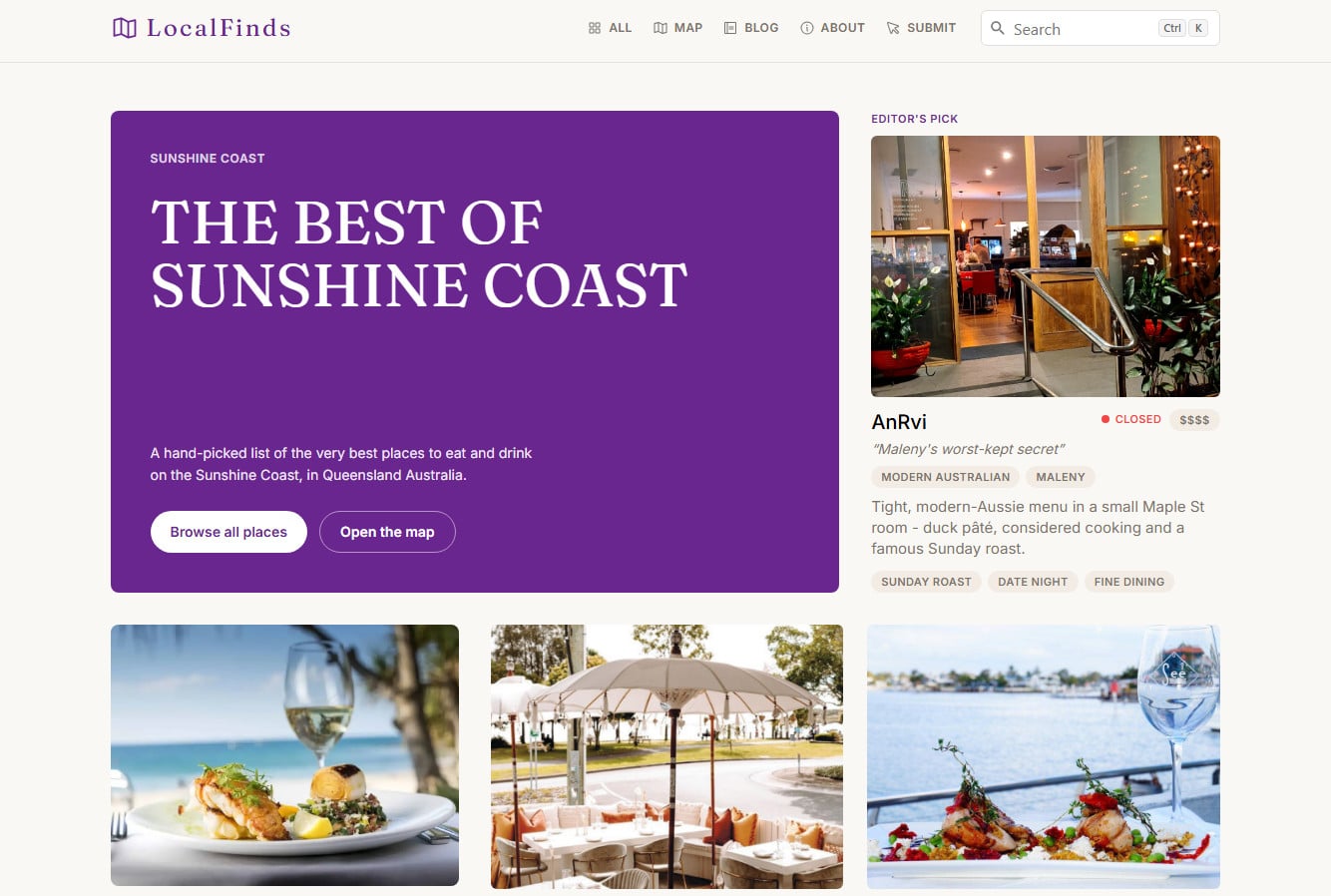
It ships configured as a hand-picked Sunshine Coast restaurant guide - a complete, real, working example - but “restaurants” is just a config value. Change one file and the same codebase becomes a hairdresser directory, a mechanic finder, a gym guide, whatever vertical you’re building a local directory for.
View the live demo here - it’s the real thing, try it before you buy. Or read the full docs first to understand what you are getting.
⚡ 30-Second Verdict
- What it is: a local-business Astro directory theme built on Astro 6 + Tailwind v4, using Airtable as the CMS and deploying to Cloudflare Workers (or Vercel, Netlify).
- The headline trick: one config file (
src/site.config.ts) controls the entire vertical - names, URLs, categories, colours, SEO copy. Switching from restaurants to beauty salons is a config edit, not a rewrite. - Content via Airtable: you manage listings in a friendly spreadsheet-style grid. No database to run, no admin panel to build.
- Genuinely fast: statically generated HTML. No per-request database hits, no plugin bloat.
- Cheap to run: mostly static on Cloudflare’s free/near-free tier. No monthly SaaS rent.
- Batteries included: filtering, map view, search, blog, three working forms with built-in spam protection, full SEO + structured data.
- Documented properly: a full docs set, including a step-by-step “convert it to a different vertical” walkthrough. Read the complete documentation before you buy.
- You own it: a commercial template, your code, your data. No lock-in.
The One-Config Idea
Here’s the part I’m proudest of, because it’s what makes the template actually reusable instead of just “a restaurant site you have to gut.”
Nothing in the components or routes says “restaurant.” The code is written in generic primitives - an Item (the thing you list), Taxonomies (the ways you categorise it), an optional Tier (price level). What those mean for your directory lives entirely in src/site.config.ts:
item: {
  singular: 'Place to Eat',
  plural: 'Places to Eat',
  slugBase: 'place',        // detail pages live at /place/<slug>
},
taxonomies: [
  { key: 'cuisine', label: 'Cuisine', plural: 'Cuisines', slugBase: 'cuisine', /* … */ },
  { key: 'area',    label: 'Area',    plural: 'Areas',     slugBase: 'area',    /* … */ },
  { key: 'tag',     label: 'Tag',     plural: 'Tags',      slugBase: 'tags',    /* … */ },
],
To turn it into a hairdresser directory, you change the labels - Cuisine becomes Specialty, Tags becomes Services, Place becomes Salon - rename the matching Airtable tables, and you’re done. No component touched, no route rewritten. The included walkthrough does exactly this conversion step by step.
That’s the difference between a template you buy once and reuse, and a template you buy once and outgrow immediately.
Airtable as Your CMS
You don’t run a database. You don’t build an admin panel. You manage your listings in Airtable - a spreadsheet that behaves like a database - and the site reads from it at build time.
Add a listing: new row, fill in the name, drag in some photos, link a category. Feature it on the homepage: tick a box. Hide it: untick “Published.” It’s the kind of interface a non-technical client or VA can manage without you.
Because the site is statically generated, your content gets baked into fast HTML at build time - there’s no live database call on every page view, which is exactly why it’s quick and cheap. (The template includes notes on auto-rebuilding when your Airtable changes, so “static” doesn’t mean “manual.”)
Two practical touches that matter in the real world: Airtable’s image URLs expire, so the build downloads your photos and self-hosts them rather than hot-linking. And there’s an optional CSV bulk-import script for seeding a directory with dozens of listings at once.
What’s Actually Included
This isn’t a landing-page-and-a-prayer. It’s a production-ready Astro business directory template:
- Listings with live filtering. Filter by your categories and price tier, with an “Open now” toggle that reads each listing’s opening hours. Mobile gets a proper slide-in filter drawer, not a squashed desktop layout.
- Rich detail pages. Photo gallery with lightbox, an Open/Closed status pill, an embedded map, “Visit website / Directions / Call” action buttons, breadcrumbs, and long-form markdown content per listing.
- A map view. Powered by MapLibre with free, keyless OpenFreeMap tiles - no Google Maps or Mapbox account, no per-load billing.
- Site search. Static, instant search via Pagefind - no search server to run.
- A blog. For the “stories”/guides content that pulls in local SEO traffic, authored in MDX.
- Three working forms - submit-a-business, contact, and newsletter - wired to Airtable, with built-in spam protection (honeypot, timing checks, origin/User-Agent validation, and per-IP rate limiting on Cloudflare). No CAPTCHA friction for real users.
- SEO done right. Per-page titles and descriptions, Open Graph + Twitter cards, JSON-LD structured data, an auto-generated sitemap, and
robots.txt. Category pages even generate their own templated, keyword-friendly titles and getnoindex’d automatically when they’d otherwise be thin.
Why an Astro Directory Template Beats WordPress for This Job
I write a lot about WordPress’s plugin security problems and the trade-offs of newer stacks, so it’s a fair question: why this stack?
A directory is mostly read-heavy, structured content - exactly the workload static generation was built for. You don’t need a PHP runtime and a MySQL database spinning on every request to show a list of restaurants that changes a few times a week. You need fast HTML and a clean way to manage the data.
Astro generates that HTML. Cloudflare serves it from the edge for a rounding-error of a hosting bill. Airtable gives you the friendly editing layer. And because there’s no plugin ecosystem with database-level access, there’s no weekly patch-or-get-hacked treadmill. The only server-side code is the three form endpoints, and they ship hardened.
The honest trade-off: this is a developer’s template. You’ll use the command line to set it up and deploy it. Once it’s running, day-to-day content management is all in Airtable and requires no code - but the initial setup assumes you’re comfortable with git clone, a config file, and a deploy command. The included documentation walks through every step, but it’s written for someone willing to touch “code”.
Who This Is For
- Developers and agencies building a local directory for a client - or as a productized, repeatable offering across multiple niches and towns.
- Founders launching a niche directory (a “best X in Y” site) who want to own the asset instead of renting a directory SaaS.
- Anyone tired of the WordPress directory-plugin experience - the slowness, the plugin sprawl, the maintenance.
Who it’s not for: if you’ve never opened vscode and don’t intend to, this isn’t the right pick - a hosted directory builder will serve you better, even at the cost of monthly fees and less control.
What You Get
- The full source code, via a private GitHub repository.
- Complete documentation: 10 docs including getting started, a full configuration reference, Airtable setup, the forms guide, deployment, theming, troubleshooting, and the restaurants-to-hairdressers conversion walkthrough.
- Support from me via email if you run into any problems.
- The example Airtable base, ready to copy into your own Airtable workspace (works on the free plan).
- A real, deployed live demo so you know exactly what you’re buying and getting.
FAQ
Is this a free or paid Astro directory template? It’s paid, $24.99, one-time. Lifetime access, free updates, no subscription.
What happens after I purchase LocalFinds?
Right after checkout you’ll get an email with an invite to a private GitHub repository containing the full LocalFinds source. Accept the invite, then either clone the repo or download it as a zip - whichever you prefer. You’ll also keep getting free updates pushed to the same repo, so a git pull is all it takes to stay current.
Do you offer refunds? LocalFinds is a digital product with instant access on purchase, so refunds aren’t offered. I understand that can be disappointing, but I’d much rather help you get it working than have you walk away unhappy. If you hit any issue, big or small, email me and I’ll do my best to sort it out.
Can I use this Astro directory template for niches other than restaurants? Yes. The vertical lives in one config file; relabel it for salons, mechanics, gyms, or any local niche without touching code. A full restaurants-to-hairdressers walkthrough is included.
Do I need to know Astro to use it? No Astro experience needed, but you do need to be comfortable with the command line for setup and deploy (git clone, edit a config file, run a deploy command). Day-to-day content editing is all in Airtable, no code.
How does the Airtable CMS work with Astro at build time? At build, the site reads your Airtable tables over the API, turns the linked records into clean URLs, downloads the images locally, and renders everything to static HTML. There’s no live database call per visit - which is why it’s fast. Content changes appear on the next rebuild (which you can automate).
Where do I deploy an Astro directory template like this? It’s configured for Cloudflare Workers out of the box (mostly static, so cheap and fast). Being standard Astro, it also runs on Netlify, Vercel, or any static host - just point the env vars at your Airtable base.
The Bottom Line
If you want a local directory site powered by Astro that’s fast, cheap to host, owned outright, and re-skinnable for any vertical, this is built for you. It’s the directory I wanted to exist and couldn’t find: not a SaaS you rent forever, not a WordPress build you babysit, but a clean, modern, documented codebase you configure once and reuse.
Live Demo
Try the live demo first. It’s the actual product running in production - if it feels fast and looks right, the code behind it is all yours to use.
▶ View the live demo · Get LocalFinds - $24.99
Lifetime access, free updates, no subscription.