The 'Your Cloud Storage Is Full' Scam Explained
Table of Contents
The “your cloud storage is full” scam is one of the most successful phishing operations on the internet right now. And it works because it exploits something we all actually worry about - losing our photos, documents, and that embarrassing shit we forgot we even uploaded.
The FTC officially warned about this scam in July 2026, which means it’s gotten bad enough that the government had to step in. That should tell you something.
What This Scam Actually Is
Here’s the deal: You get an email or text claiming your Dropbox, iCloud, Google Drive, or OneDrive storage is full.
It looks legit - they’ve got the logos, the urgent language, the whole nine yards. They’re telling you that your precious data is about to be deleted unless you click this link and upgrade your storage RIGHT NOW.
Spoiler alert: It’s complete bullshit.
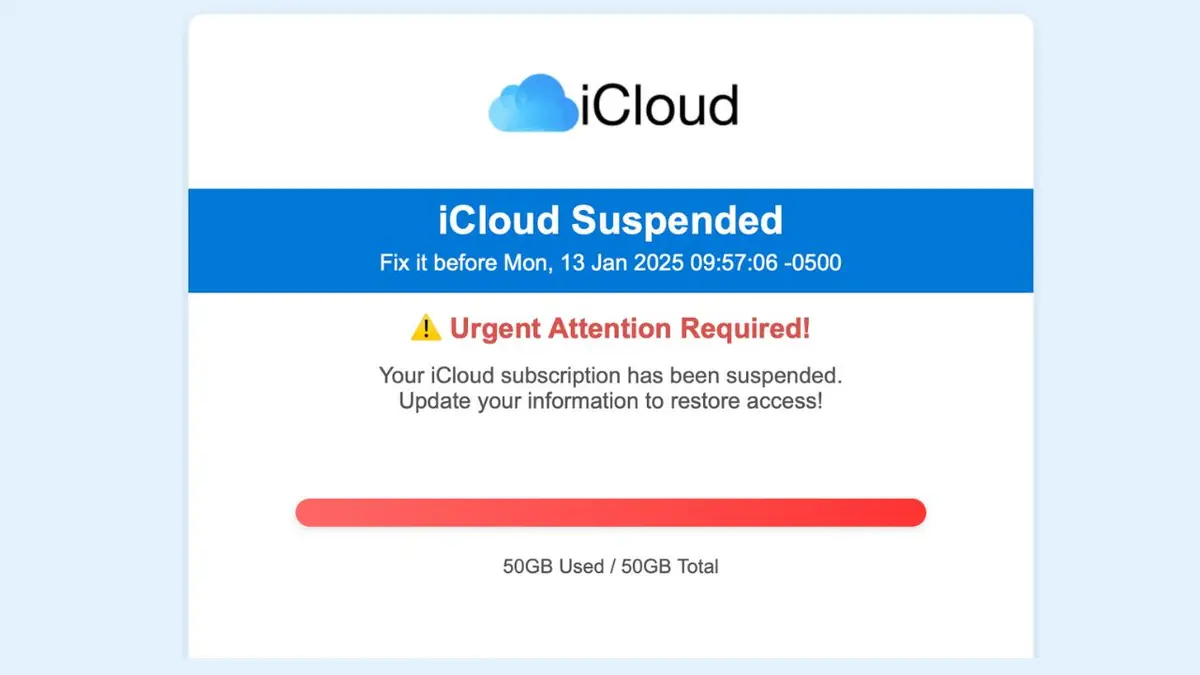
According to Trend Micro’s analysis, these scams are designed to create urgency and fear about cloud storage issues. Their goal? Trick you into clicking links that lead to fraudulent websites designed to steal your login credentials.
And once they have your credentials? They’ve got access to everything - your photos, your documents, your contacts, and any payment information linked to your account.
How These Assholes Operate
Let me break down their playbook:
Step 1: The Panic Button
You get an email with subject lines like:
- “Payment Failure for iCloud Storage Renewal”
- “Your Cloud Storage is 96% Full”
- “WARNING: Your iOS cloud backup is at capacity”
- “All files will be WIPED if you do not take action immediately”
PCRisk documented multiple variations of these emails, including ones that claim “24 security threats detected” alongside the storage warning. Because why scare you with one fake problem when you can scare you with two?
Step 2: The Fake Deadline
They give you some arbitrary deadline - “24 hours,” “before Monday,” “today only.” This is psychological manipulation 101. They want you panicking and clicking before you have time to think.
Step 3: The “Deal”
Here’s where it gets clever: They offer you a “special deal” - usually something like 50GB for $1.95. It’s cheap enough that you might think it’s harmless and just click through without verifying.
Step 4: The Phishing Site
That link? It goes to a fake login page that looks exactly like Apple, Google, or Microsoft’s real site. You enter your credentials, and boom - they’ve got you.
Step 5: The Takeover
Now they’re in your account. They can:
- Access all your stored files
- View your personal photos and documents
- Steal payment information
- Lock you out by changing your password
- Use your account to scam your contacts
- Install malware on your devices
Red Flags That Scream “SCAM”
Look, I’m not gonna sugarcoat this - if you fall for these, you’re not paying attention. Here’s what to look for:
The Email Address Doesn’t Check Out
Legitimate Apple emails come from @apple.com or @icloud.com. Not @mail-apple-support.com or @icloud-security.net or whatever domain they’re using this week.
According to Microsoft’s own documentation, real OneDrive emails come from specific Microsoft domains. If it’s not from those exact domains, it’s fake.
Generic Greetings
“Dear Customer” or “Dear User” instead of your actual name? That’s because they’re sending this same email to thousands of people. Real companies use your name.
Spelling and Grammar Errors
Sometimes legitimate companies make mistakes in their copy too. But if you’re seeing multiple errors, that’s a red flag.
Hover Over the Links
Don’t click - just hover your mouse over the link. The URL that appears is usually some sketchy domain that has nothing to do with Apple, Google, or Microsoft.
Threats and Urgency
Real companies don’t threaten to delete all your data in 24 hours. They send you multiple warnings over weeks or months. If it’s creating panic, it’s probably fake.
What Actually Happens If You Fall For It
Here’s what scammers can do once they have your credentials:
Immediate consequences:
- They’re in your account within minutes
- They can see everything you’ve stored
- They have access to any payment methods on file
Escalating damage:
- They change your password and lock you out
- They use your account to scam your contacts
- They steal your identity using your stored documents
- They make unauthorized purchases with your saved payment info
- They install malware on your devices through your account
According to PCRisk’s research, victims can experience “system infections, severe privacy issues, financial losses, and identity theft.”
Yeah, it’s that bad.
How to Protect Yourself (Because I’m Not Completely Heartless)
Don’t Click Shit
First rule: Don’t click links in emails claiming your storage is full. Just don’t.
Verify Directly
Instead, go directly to your cloud provider:
- iCloud: Settings on your iPhone/iPad, or appleid.apple.com
- Google Drive: drive.google.com or your Google account settings
- OneDrive: onedrive.com or your Microsoft account
Check your actual storage status there. Not through some sketchy email link.
Enable Two-Factor Authentication
If you haven’t done this yet, do it now. 2FA means even if they get your password, they still can’t access your account without the second factor.
Use Strong, Unique Passwords
I know, I know - you’ve heard this a million times. But people are still using “password123” and then wondering how they got hacked.
Get Decent Antivirus Software
Look, I’m not gonna shill for specific antivirus products here. Just get something reputable that can catch phishing attempts and malware.
What to Do If You Got Compromised
If you already clicked and entered your credentials, here’s your damage control checklist:
Immediate Actions (Do This NOW)
- Change your password immediately - Go directly to the real site, not through any email links
- Enable 2FA if you haven’t already
- Check your account activity - Look for unauthorized access or changes
- Review payment methods - Make sure they haven’t added their own or made purchases
- Scan your devices for malware - They might have installed something
Report That Shit
The FTC recommends:
- Forward the phishing email to [email protected]
- Report it to the FTC at ReportFraud.ftc.gov
- Forward phishing texts to SPAM (7726)
- Report it to the company being impersonated
Financial Damage Control
- Contact your bank/credit card company
- Dispute any unauthorized charges
- Consider a credit freeze if they got enough info for identity theft
- Monitor your credit reports
How Legitimate Companies Actually Communicate
Let me tell you how the real companies handle storage issues, so you know what’s legit:
Apple/iCloud
- They send notifications through your device settings first
- Emails come from
@apple.comor@icloud.comdomains only - They don’t threaten immediate data deletion
- They don’t offer “special deals” through email links
Google Drive
- Notifications appear in your Google account
- Emails come from
@google.comdomains - They give you plenty of warning before any action
- They don’t create artificial urgency
Microsoft OneDrive
- Notifications through your Microsoft account
- Emails from official Microsoft domains only
- Multiple warnings over time, not sudden threats
- No pressure tactics
The Bigger Picture: Why This Scam Works So Well
Here’s the thing that pisses me off: This scam works because cloud storage companies have trained us to be paranoid about storage limits.
They give you measly 5GB free, then constantly nag you to upgrade (looking at you Apple / iCloud). So when you get an email saying your storage is full, it doesn’t seem that far-fetched.
The scammers are exploiting legitimate anxiety that the companies themselves created. It’s almost poetic, in a fucked-up way.
Related Scams to Watch Out For
While we’re on the topic, these assholes are running similar scams with:
- Subscription renewal failures
- Account suspension threats
- Security breach notifications
- Payment method updates required
- Device backup failures
The pattern is always the same: Create urgency, offer a simple solution, steal your credentials.
The Bottom Line
Look, I’m not here to hold your hand and tell you everything’s gonna be okay. The internet is full of people trying to steal your shit, and cloud storage scams are just one flavor of that bullshit.
But here’s what you need to remember:
- Legitimate companies don’t threaten to delete your data in 24 hours
- Always verify storage issues directly through official apps/websites
- Never click links in emails claiming urgent account problems
- Enable 2FA on everything that matters
- When in doubt, assume it’s a scam
And for God’s sake, if you get one of these emails, don’t just delete it - report it. The more people report these scams, the harder it becomes for these assholes to operate.
Resources (Because I’m Not Completely Useless)
- FTC’s official warning about cloud storage scams
- Trend Micro’s analysis of iCloud storage scams
- PCRisk’s detailed breakdown of cloud storage phishing
- Report phishing: [email protected]
- Report fraud: ReportFraud.ftc.gov
Stay paranoid out there. It’s the only way to stay safe online.